Mar 15, 2026 | Blog, Education Technology,School Management, Tech, Culture
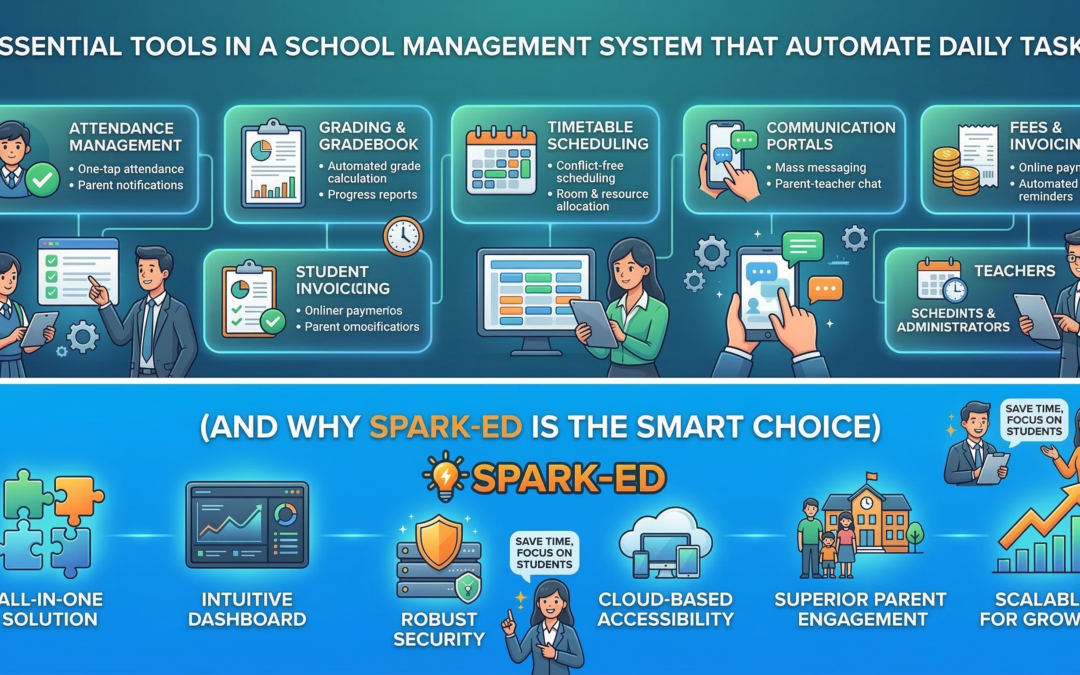
Essential Tools in a School Management System That Automate Daily Tasks (And Why Spark-ED Is the Smart Choice)
Running a school involves an almost overwhelming number of daily moving parts — attendance registers, fee collections, timetable changes, parent communications, exam results, HR records, and more. When these are handled manually or spread across disconnected tools, they become a drain on time, budget, and staff energy.
The right school management system doesn’t just digitize these tasks — it automates them. Here’s a look at the essential tools every school management system should have, what they should actually do, and why Spark-ED brings them all together in one seamless platform.
- Automated Attendance Tracking
Manual attendance registers are slow, error-prone, and hard to analyze. A proper school management system should capture student and staff attendance digitally — via web portal, mobile app, or biometric integration — automatically flag chronic absenteeism, send real-time alerts to parents, and generate attendance reports without any manual effort.
When attendance is automated, teachers save time every morning, parents stay informed without having to call the school, and administrators can spot patterns before they become problems.
How Spark-ED handles it: Spark-ED includes a built-in digital attendance module that logs records class by class, triggers parent notifications instantly, and gives administrators a live dashboard view of school-wide attendance.
- Fee Management and Automated Billing
Fee collection is one of the most time-consuming administrative functions in any school. Without automation, finance teams chase payments manually, issue receipts by hand, and spend hours reconciling records.
A good school management system should automatically generate term-based or monthly fee invoices, send payment reminders to parents via SMS or email, accept online payments and record them in real time, and produce detailed financial reports — outstanding dues, collection summaries, fee waivers — without manual input.
How Spark-ED handles it: Spark-ED’s fee management module automates the full billing cycle, from invoice generation to payment confirmation, with a parent-facing portal where families can view balances and pay directly online.
- Timetable and Scheduling Automation
Building a school timetable manually — accounting for teacher availability, room capacity, subject loads, and exam periods — can take days. When something changes mid-term, it starts again.
An automated scheduling tool should generate conflict-free timetables based on constraints you define, adjust dynamically when a teacher is absent or a room is unavailable, push updated schedules to teachers, students, and parents in real time, and handle exam scheduling with its own room and invigilator logic.
How Spark-ED handles it: Spark-ED includes an intelligent timetable builder that factors in your school’s specific rules and constraints, and broadcasts any changes instantly across all connected users.
- Academic and Gradebook Management
Exam results and grade tracking should never live on spreadsheets that get lost or overwritten. A school management system should give teachers a structured gradebook and automate the reporting that follows — with configurable grading schemes, automatic grade calculations based on weightage you define, instant generation of report cards and transcripts, and historical academic records accessible anytime.
How Spark-ED handles it: Spark-ED’s academic module lets teachers log assessments and marks in one place, with report cards generated automatically at the end of each term — no manual formatting required.
- Parent and Student Communication Portal
Schools that rely on printed circulars, WhatsApp groups, or separate email threads for parent communication are creating unnecessary fragmentation. A dedicated communication module should enable broadcast announcements to all parents or specific classes, two-way messaging between teachers and parents, event and calendar notifications pushed automatically, and alerts tied to student events — attendance, grades, discipline — without any extra admin effort.
How Spark-ED handles it: Spark-ED includes a fully integrated parent portal and communication hub, so schools can retire the scattered group chats and keep every interaction documented and organized.
- HR and Staff Management
Managing teaching and non-teaching staff involves more than just a roster. A school management system should handle employee profiles and contract records, leave requests and approvals with automatic tracking, staff attendance linked to payroll calculations, and performance records and appraisal workflows.
How Spark-ED handles it: Spark-ED’s HR module centralizes all staff records and automates leave management, so HR teams aren’t buried in paperwork and staff have visibility into their own records.
- Learning Management System (LMS) Integration
Post-pandemic, the expectation that schools can deliver learning digitally is now standard — not optional. An LMS embedded in your school management system means teachers can upload lesson materials, assignments, and quizzes in one place, students access everything through a single login, assignment submissions and grading happen in the same system as the gradebook, and blended learning becomes a natural part of school operations.
How Spark-ED handles it: Spark-ED includes a native LMS, meaning your academic management and digital learning environment are not separate tools that need to be integrated — they are one.
- Admissions and Enrollment Automation
Admission season is a high-pressure period for school admin teams. Without automation, it means printing application forms, chasing documents, manually updating registration status, and handling payments separately. A modern school management system should offer an online application portal, automatically move applicants through stages from inquiry to enrollment, collect fees online at the point of registration, and feed new student data directly into the student information system upon enrollment.
How Spark-ED handles it: Spark-ED’s admissions module digitizes the entire process from first inquiry to first day, reducing the administrative workload of enrollment season significantly.
Why a Disconnected Toolkit Is Costing Your School More Than You Think
Many schools piece together their operations using a combination of spreadsheets, standalone software, and free tools. It feels manageable — until it isn’t.
The real cost shows up in hours spent re-entering the same data in multiple places, errors caused by information that is out of sync, staff time spent chasing records that should be instantly accessible, parents who feel uninformed and underserved, and leadership that can’t make data-driven decisions because the data is scattered.
A single, integrated school management system eliminates all of this.
Spark-ED: All of This, in One Platform
Spark-ED by Kingslee Inc. is built specifically for schools that want to move beyond patchwork systems and run everything from one place. It covers student information management, attendance with parent notifications, fee and billing automation, timetable and scheduling, academic records and report card generation, parent and teacher communication, a built-in LMS, HR and staff management, and online admissions and enrollment.
Whether you’re a small private school or a multi-campus institution, Spark-ED scales to fit your structure — and grows with you as your school grows.
Ready to see what automation looks like for your school? Explore Spark-ED or book a free demo with the Kingslee team today.
Mar 10, 2026 | Blog, Tech, Culture
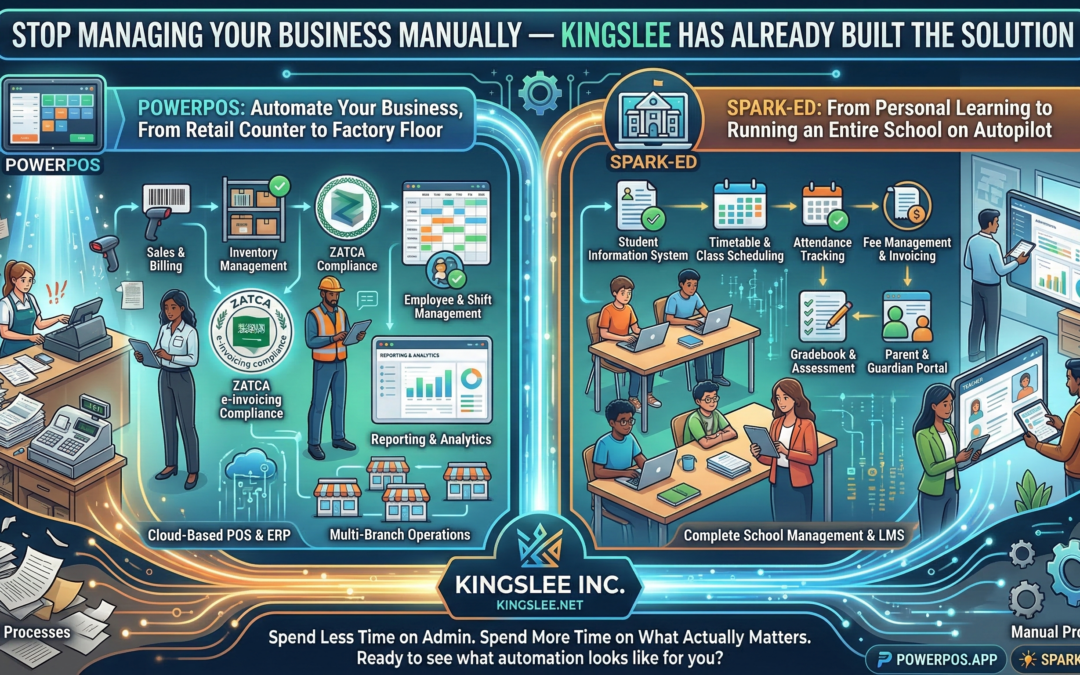
Stop Managing Your Business Manually — Kingslee Has Already Built the Solution
Whether you run a corner store, a manufacturing plant, a tutoring centre, or an entire school district, one truth remains constant: manual processes are silently draining your time, money, and growth potential. Kingslee Inc. exists to solve exactly that — with two purpose-built software platforms that automate the operations businesses and educational institutions deal with every single day.
What Is Kingslee?
Kingslee Inc. (kingslee.net) is a software company with a focused mission: eliminate operational friction for businesses and schools through intelligent, easy-to-use automation. Its two flagship products — PowerPOS and Spark-ED — cover opposite ends of the business spectrum, yet both deliver the same outcome: you spend less time on admin and more time on what actually matters.
PowerPOS: Automate Your Business, From Retail Counter to Factory Floor
If your business involves selling, tracking inventory, managing employees, or reporting to a tax authority — PowerPOS (powerpos.app) was built for you.
PowerPOS is a cloud-based Point of Sale and ERP system designed for businesses of all sizes. Whether you’re running a single retail outlet, a chain of restaurants, a wholesale distributor, or a production facility, PowerPOS handles the operational backbone so you don’t have to.
Here’s what it automates for you:
Sales & Billing — Process transactions in seconds, generate invoices automatically, and manage multiple payment methods without lifting a spreadsheet.
Inventory Management — Track stock in real time across multiple locations. Get low-stock alerts before you run out, and automate reorder triggers so shelves are always full.
ZATCA E-Invoicing Compliance (Saudi Arabia) — If you operate in the Kingdom, ZATCA compliance is non-negotiable. PowerPOS is built to generate fully compliant e-invoices automatically, keeping your business audit-ready without the legal headache.
Employee & Shift Management — Assign roles, track hours, and manage payroll data from one dashboard.
Reporting & Analytics — From daily sales summaries to monthly P&L breakdowns, PowerPOS generates reports that give you a clear picture of your business health — instantly, not after a week of number-crunching.
Multi-Branch Operations — Managing more than one location? PowerPOS connects them all under a unified system, so you see everything from one place.
PowerPOS is especially powerful for businesses in Saudi Arabia and the UK, where regulatory requirements around invoicing and reporting make manual compliance a serious liability. With PowerPOS, compliance becomes automatic.
If you’re still running your business on paper records, WhatsApp order confirmations, or a patchwork of disconnected tools — you’re leaving money on the table and creating risk every single day.
Spark-ED: From Personal Learning to Running an Entire School on Autopilot
Education is one of the most administratively heavy industries in the world. Attendance, timetables, grades, parent communication, fee collection, staff management, course delivery — every one of these is a daily operational challenge. Spark-ED (spark-ed.app) is built to handle all of it.
Spark-ED is a complete school management system designed for K-12 schools, higher education institutions, academies, and individual educators who want to deliver structured online learning without the technical complexity.
For individual tutors and independent educators, Spark-ED functions as a personal LMS (Learning Management System) — create courses, upload content, assign assessments, track learner progress, and communicate with students, all from one clean interface.
For schools and institutions, Spark-ED scales into a full administrative platform:
Student Information System — Maintain detailed records for every student: enrollment data, academic history, attendance, health notes, and parent contacts.
Timetable & Class Scheduling — Build complex timetables in minutes, assign teachers to classes, and automatically resolve scheduling conflicts.
Attendance Tracking — Mark and monitor attendance digitally, with instant alerts for unexplained absences sent directly to parents.
Fee Management & Invoicing — Automate fee collection, generate parent invoices, track outstanding payments, and produce financial reports without a separate accounting system.
Gradebook & Assessment — Teachers enter marks once; Spark-ED calculates averages, generates report cards, and maintains academic records automatically.
Parent & Guardian Portal — Give parents real-time access to their child’s attendance, grades, and school communications — reducing the volume of calls and emails your staff handles every day.
Staff & HR Management — From teacher contracts to substitution tracking, Spark-ED keeps your HR operations in order.
For academies and training centres, Spark-ED sits perfectly in the middle: more powerful than a basic LMS, more flexible than rigid university software, and priced for institutions that can’t afford enterprise-level complexity.
Why Kingslee Over Generic Software?
There are dozens of generic POS systems and dozens of generic school management tools on the market. Most of them are built for a hypothetical average business in a Western market, then awkwardly adapted for everywhere else.
Kingslee’s products are different. PowerPOS was built with ZATCA compliance baked in from day one — not bolted on as an afterthought. Spark-ED was designed with the operational realities of schools in growth markets, where administrative resources are lean and the software has to do more of the heavy lifting.
Both platforms are cloud-based, which means zero expensive hardware, automatic updates, and access from anywhere. Both are designed to be operational within days, not months. And both are backed by a team that actually supports you after the sale.
The Real Cost of Not Automating
Every hour your staff spends on manual data entry, chasing paper invoices, or reconciling attendance records by hand is an hour not spent on customers, students, or growth. The cost isn’t just time — it’s errors, compliance gaps, delayed decisions, and staff burnout.
Businesses and schools that automate their operations consistently outperform those that don’t. They make faster decisions because their data is current. They catch problems earlier because their systems flag them automatically. They scale more smoothly because their processes don’t depend on any one person remembering to do something.
Ready to See What Automation Actually Looks Like for Your Business or School?
Visit kingslee.net to explore both platforms, or go directly to powerpos.app for retail and business automation, or spark-ed.app for education management.
The demo is free. The time you’ll save is immediate. The question isn’t whether you can afford to automate — it’s whether you can afford not to.

Feb 17, 2026 | Blog, Tech, Culture
There’s a line I keep hearing from developers lately, usually said with a mixture of pride and mild embarrassment: “I can’t read documentation anymore.”
Not because the docs are bad. Not because they don’t have time. But because somewhere between the rise of GitHub Copilot, ChatGPT, and a dozen other AI coding assistants, the muscle that used to sit quietly and work through a problem — page by page, error by error — has started to atrophy.
And I think we need to talk about that.
The Friction Was the Feature
For a long time, the hardest parts of learning to code were also the most valuable. Spending three hours hunting a missing semicolon taught you to read your own code with forensic precision. Trudging through Stack Overflow threads from 2011 gave you context — you understood why a pattern existed, not just that it existed. The friction was slow, frustrating, and quietly building something inside you.
Now, that friction is almost optional.
AI tools have become so capable that a developer can go from idea to working prototype in an afternoon without deeply understanding a single line of the output. That’s genuinely remarkable. It’s also, depending on who you ask, either the most exciting thing to happen to software development in a generation — or a slow-moving crisis nobody wants to acknowledge out loud.
This Isn’t a “Kids These Days” Argument
Before we go further: this is not a nostalgia post. I’m not going to tell you to learn assembly language or insist that real programmers write everything in Vim. The tools we have now are extraordinary, and refusing to use them out of some misplaced sense of purity would be like a carpenter refusing a nail gun because they started with a hammer.
The question isn’t whether to use AI tools. The question is whether we’re being intentional about what we let them replace.
There’s a difference between using a calculator because arithmetic is beneath the task at hand, and losing the ability to estimate whether an answer is roughly correct. The first is efficiency. The second is a quiet loss of something you didn’t notice leaving.
What’s Actually Changing in Developer Culture
Talk to engineering managers at mid-size companies right now and a pattern emerges. Junior developers are shipping faster than ever. Their code often looks clean, well-commented, and follows modern conventions. But ask them to debug something unfamiliar without an AI assist, or to reason through a system design problem from first principles, and there’s a hesitation that wasn’t quite there before.
Meanwhile, senior developers are reporting something different: a strange kind of cognitive offloading that feels productive in the moment but leaves them vaguely unsettled. The deep, immersive focus that used to define a good coding session — the kind where two hours vanish and you surface with a genuine understanding of what you built — is getting harder to find.
We’re optimizing for output. We may be inadvertently de-optimizing for understanding.
The Attention Economy Already Did This Once
We’ve been here before, just with different tools.
When smartphones arrived, we didn’t immediately lose our ability to concentrate. It happened gradually — one notification at a time, one scroll at a time — until one day people found themselves genuinely unable to sit with a book for twenty minutes without reaching for their phone. The capability didn’t vanish overnight. It eroded.
The concern with AI coding assistants isn’t that they’ll make developers redundant (a conversation that is frankly getting boring). It’s that they’ll make a certain mode of thinking redundant — the slow, patient, generative kind that produces not just working code but deep expertise.
So, What Do We Actually Do About It?
A few things that seem worth trying — not as rules, but as deliberate choices:
Build something without assistance, regularly. Not everything. Not forever. Just one small project a month where you sit with the discomfort of not knowing and work through it the long way. Treat it like going to the gym for a part of your brain you don’t want to lose.
Read the code the AI gives you like it’s a suspect, not a colleague. Don’t just run it — interrogate it. What does this actually do? Why this approach and not another? Could this fail? Where? This habit turns AI from an answer machine into a teaching tool.
Reintroduce documentation as a first stop, not a last resort. Official docs are written by people who understand the system at a level that a summarizing AI model may not fully replicate. There’s texture in documentation that gets compressed away. Sometimes that texture matters.
Have the honest conversation with your team. If you’re leading developers, ask openly: are we building expertise, or are we just building features? The answer can be both — but only if you’re paying attention.
The Bigger Picture
The technologies that reshape how we work always reshape how we think. Word processors changed how people compose sentences. Search engines changed how people recall information. AI assistants are changing how developers solve problems — and that process is happening faster than our culture of craft has had time to respond.
That’s not a reason for panic. It is a reason for intentional.
The developers who will be exceptional a decade from now probably won’t be the ones who refused to use AI tools, or the ones who handed everything to them. They’ll be the ones who stayed curious about the machinery underneath — who used powerful tools without letting those tools do all the thinking.
Patience, after all, is not just a virtue. In software, it’s a skill.